Reduce manual effort and improve accuracy with automated tax data workflows in Bloomberg Tax Workpapers. See how it works.
For too long, tax professionals have been focused on filing tax returns and improving that process, and haven’t given the same attention to the challenges with their workpapers and calculations behind them.
This compliance-first mindset has created fragmented workflows, repetitive tasks, and limited innovation in tax technology. The tools available focus narrowly on compliance rather than optimizing the entire tax process.
The result? Reduced efficiency and an overreliance on disconnected tools that fail to meet the demands of complex tax work.
Specialized workpaper software presents an opportunity to transform the process with tax automation and tax-specific functionality. This article covers what tax departments have to gain from relying on tax technology to modernize their workflows.
[Read our full report, 6 Tax Processes You Can (and Should) Automate, to learn how to save time, reduce risks, and increase flexibility in your tax workpapers.]
What are tax workpapers?
Tax workpapers are spreadsheet calculations based on interpretations of the tax law applied to a company’s facts and financials that support several core tax functions, including:
- Compliance — Maintaining accurate and organized workpapers is critical in supporting a company’s position, interpreting the tax laws, and minimizing the risk of penalties.
- Provision — Having reliable and accurate provision workpapers is critical to every company as they are audited and highly visible to external stakeholders.
- Audits — Having well-prepared and documented workpapers makes audits smoother, faster, and less stressful – and they provide the audit trail needed.
- Planning — Maintaining tax workpapers enables tax departments to effectively analyze financial data, make informed decisions, and strategically plan.
Clearly, workpapers are the underpinning of these core corporate tax workflows and are of crucial importance for tax teams. In fact, 92% of corporate tax professionals said workpapers are “very important or critical for supporting the overall tax lifecycle,” according to a 2023 survey conducted by Bloomberg Tax and Arizent.
Why update your workpapers process?
Workpapers are where some of the most complicated and time-consuming tax work is done. This critical part of the tax workflow is currently underserved by existing solutions, which results in most of this work taking place entirely in Excel.
In fact, according to the 2023 survey that Bloomberg Tax conducted with Arizent, these are the top five challenges of workpapers:
- Manually prepping data for use in workpapers
- Updating calculations for multiple versions of source data
- Keeping calculations up to date with the latest tax law
- Identifying risks to efficiently target areas of review
- Sufficiently supporting your tax positions and calculations with explanations, primary or secondary authority, etc.
Given these issues, and more, many tax departments have viewed their workpapers process as something they want to optimize – but they lack the time, resources, or expertise to tackle it.
So many tax departments decide to outsource this work. And while outsourcing can save time, one downside is that tax teams lose control in the tax process – which can introduce new risks for error. Outsourcing also can lead to confusion with interpreting workpapers that are prepared by someone else.
Meanwhile, other tax departments decide to take on this arduous work themselves, and they choose to recreate or tweak their Excel-based workpapers to support the desired tax function. But the Excel process also has clear downsides.
What you risk when using Excel
Financial data from accounting ERPs are the starting point for most tax workpapers. Many companies operate with multiple ERPs due to company growth via mergers and acquisitions over time. As a result, tax departments deal with inconsistent data sources and formats from various sources.
Many tax teams will then turn to Excel, but these workpapers often use error-prone tools such as pivot tables and VLOOKUP to populate source data into the spreadsheet. These tools are not especially intuitive or easy to use, and they make it challenging to update data. In fact, it is very easy to mess up long formulas, particularly when referencing another data file.
Excel and other existing tools also lack native controls – such as review signoffs, user access, and permissions – which introduces risk into workpaper workflows. For instance, Excel’s lack of cell-level tracking of changes and its lack of ability to mark a cell as reviewed make it difficult for teams to keep track of updates and versions, and who made those edits. And its inadequate access controls may allow unauthorized individuals to make changes.
It’s true that Excel is a popular software option and many tax professionals like its familiarity. However, it’s not the best option for workpapers. Excel can be tedious, prone to human error, and devoid of controls and repeatability, and often relies on macro-based automation or extensive and complex formula-based automation – which can be very useful to minimize manual work within spreadsheets but are downright archaic in comparison to today’s technological innovations.
But even with these known issues, Excel has been ubiquitous for tax teams when it comes to workpapers. And tax teams are paying the price. In the 2023 survey by Bloomberg Tax and Arizent, 89% of corporate tax professionals said their current workpapers process is difficult, while 92% said it’s overly time-consuming.
With all this time spent wrestling with workpapers, it’s no wonder there is little to no time left for optimization.
The benefits of workpaper software: Simplifying and automating your calculations and data management
It’s clear that tax departments need a fresh, modern approach to simplify the workpaper creation and maintenance process – a solution that is easy to use, yet robust enough to handle the complexities inherent in the overall tax lifecycle.
Bloomberg Tax Workpapers is a first-of-its-kind solution that transforms the workpapers process. Its built-in automation capabilities help streamline workflows, reduce errors, and, most importantly, reclaim valuable time that can be better spent on strategic, high-value tasks.
[Read our full report, 6 Tax Processes You Can (and Should) Automate, to learn how you save time, minimize risks, and increase flexibility in your tax workpapers.]
Challenges that workpaper software helps solve
Here, we’ll review six common challenges that workpaper software can help solve – so you can save time, reduce risks, and increase flexibility in your tax workpapers.
(The following is an excerpt from our full report, 6 Tax Processes You Can (and Should) Automate.)
- The challenge: A lack of automation for the roll forward process.
The solution: Rollforward automation for prior period workpapers.
Automating the rollforward process minimizes manual intervention and the associated risk of errors. It also significantly reduces the time and effort involved. With Bloomberg Tax Workpapers, it’s as easy as clicking a button, and the system intelligently updates the workpapers with the new period’s data.
This capability significantly reduces the manual updates needed to create a workpaper in the new period. The rollforward automation finds and updates the formulas and links within the workpaper to the desired new period – providing the preparer a head start in constructing the new workpaper.
Likewise, reviewers can easily verify that the rollforward is complete and feel confident that the workpaper links are in place and cell-level signoffs are reset for the new period.
- The challenge: Manual, repetitive work for data transformation.
The solution: Automation that gathers current period data from source systems.
One of the greatest benefits of automation is the ability to plug in directly to data sources and transform them into usable formats. Bloomberg Tax Workpapers enables a secure file transfer protocol (SFTP), allowing you to pull data from ERP and GL systems directly to your workpapers.
You don’t need to recreate data cleanup steps repeatedly each year – or any time new data or a new trial balance becomes available. This cuts down on a significant amount of manual, repetitive work you must do every year before even getting to the tax calculation step.
- The challenge: Difficulty pulling data into workpapers.
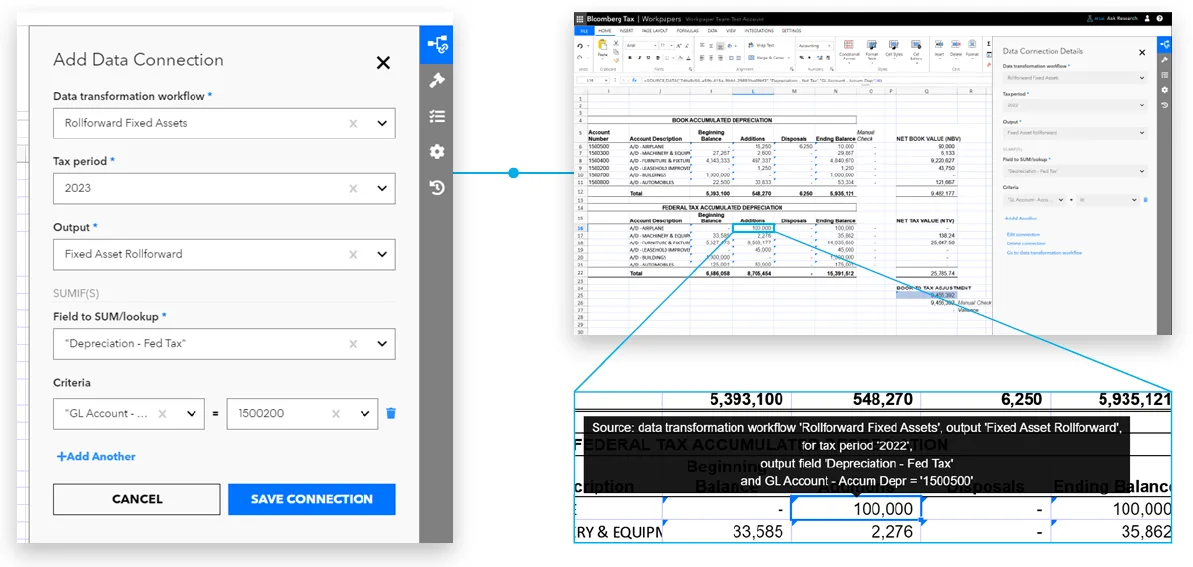
The solution: Simplified data preparation via our data connection process.
Technology built for tax processes can make pulling data into your workpapers much faster and smoother – not simply for same as last year (SALY) information, but also anything that has changed.
Bloomberg Tax Workpapers has two main components: Data Connect and Spreadsheets. The Data Connect component automates the process of gathering and transforming data from multiple ERPs to assist with data manipulation and reconciliation. This feature allows you to use a data connection to link source data directly into your workpaper calculations, simplifying preparation.
This data connection process simplifies long, complex formulas and large data references that become hard to review and maintain. The spreadsheet component has the same functionality as Excel but is designed for tax professionals to develop and maintain tax calculations that can be reviewed and audited in a controlled environment.
So, if you need to make a copy of a workpaper or rollforward to the next period, you don’t have to start over and redo the linking – you simply replace the source file, and the system updates your workpapers automatically. When your workbook has 50 or more links, automation saves a significant amount of time.
- The challenge: Time-consuming process for tax law justification.
The solution: Built-in, expert verified formulas that speed up the tax calculation process.
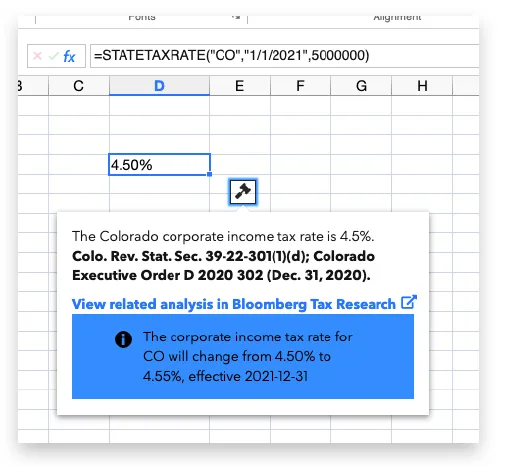
Traditionally, confirming tax law justification requires research from preparers in disparate solutions outside of where the workpapers are prepared or updated. Rates and regulations change constantly, and businesses may enter new jurisdictions, forcing you to look up new rates, dates, calculation methods, and other pertinent tax information.
With the integration of Bloomberg Tax Research, a trusted source of tax intelligence, Bloomberg Tax Workpapers makes it simple to ensure you are using the latest rates and tax law updates to inform your calculations.
Built-in custom tax formulas will draw directly from expert-verified information in Bloomberg Tax Research, and the AI-powered question answering tool provides instant explanations of tax laws and regulations along with access to source documents for deeper research.
This automation speeds up the tax calculation process, putting critical information right at your fingertips. Integrated intelligence also increases confidence and improves reviewability and auditability of your workpapers with embedded citations to primary source guidance and links to related Bloomberg Tax Research content, enabling deeper analysis when necessary.
- The challenge: A lack of control over workpaper signoffs.
The solution: Native workpaper controls that stand up to a SOX audit.
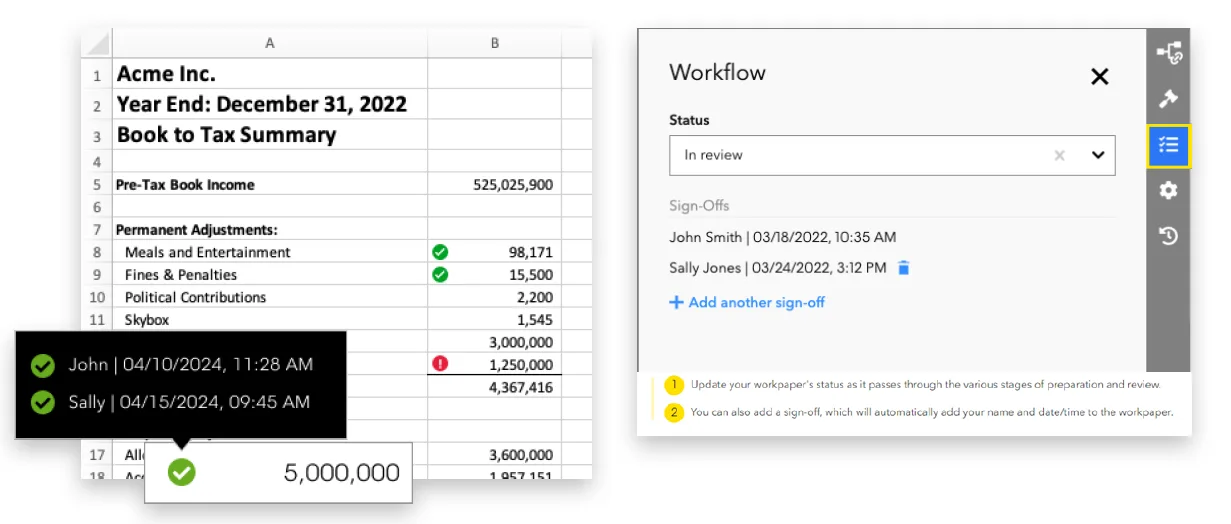
Bloomberg Tax Workpapers offers the flexibility and speed of a spreadsheet with controls that stand up to the rigors of a SOX audit.
Cell-level change tracking and reviews allow you to see who made changes within a cell or calculations within the workpaper. The user, the change, and the date and time are recorded and visible, eliminating the risk of unintended changes to the workpaper calculations.
Document signoff allows you to record multilevel approvals, improving the audit trail and keeping last-minute changes from bypassing the review step by highlighting any changes post-review.
In addition, as experienced professionals leave the workforce, workpapers software can be a repository for accumulated knowledge by creating standardized templates and workflows. This ensures consistency in tax preparation and documentation – allowing employees to document their work processes, help newer staff with a smoother transition, and reduce the impact of knowledge loss.
- The challenge: Difficulty with sending final calculations to other workpapers or systems.
The solution: Integration capabilities that allow for seamless data transfer.
The integration capabilities of Bloomberg Tax Workpapers allow for seamless data transfer to other relevant workpapers, which enhances consistency and efficiency.
For example, Bloomberg Tax Workpapers integrates with Bloomberg Tax Provision and Bloomberg Tax Fixed Assets, allowing for the direct transfer of data into these solutions. Bloomberg Tax Workpapers Data Connect automates straightforward and complex tax adjustments, saving time when an accounting team has last-minute changes.
Connecting tax calculations in Workpapers to Provision provides a complete end-to-end provision process. In addition, Bloomberg Tax Workpapers is integrated with Bloomberg Tax Fixed Assets to pull data directly in and out of Data Connect and can be used to automate additional fixed asset analysis and workpaper creation.
With tax tools that talk to each other and share data through key integrations, you can have confidence that everything from data gathering to calculations to reporting will be consistent and efficient.
Bloomberg Tax also supports exporting to Excel, offering flexibility for importing final numbers into various tax preparation solutions and other third-party software.
[Read our full report, 6 Tax Processes You Can (and Should) Automate, to learn how to save time, reduce risks, and increase flexibility in your tax workpapers.]
Integration that improves the entire tax workflow
To truly reap the benefits of modern technology, tax teams must look beyond compliance deliverable systems to tax automation solutions purpose-built for workpaper calculations. This shift in thinking will result in a more integrated, efficient, and intelligent tax workflow.
Bloomberg Tax Workpapers revamps manual processes, allows for more consistency in departmental processes, and solves key challenges in the tax workpapers process by automating data prep, strengthening controls, and streamlining tax calculations – all in one solution.
Request a demo to see how our purpose-built suite of solutions can help your tax department automate tedious work, minimize risk, and put you in the best tax position possible.